August 26, 2026
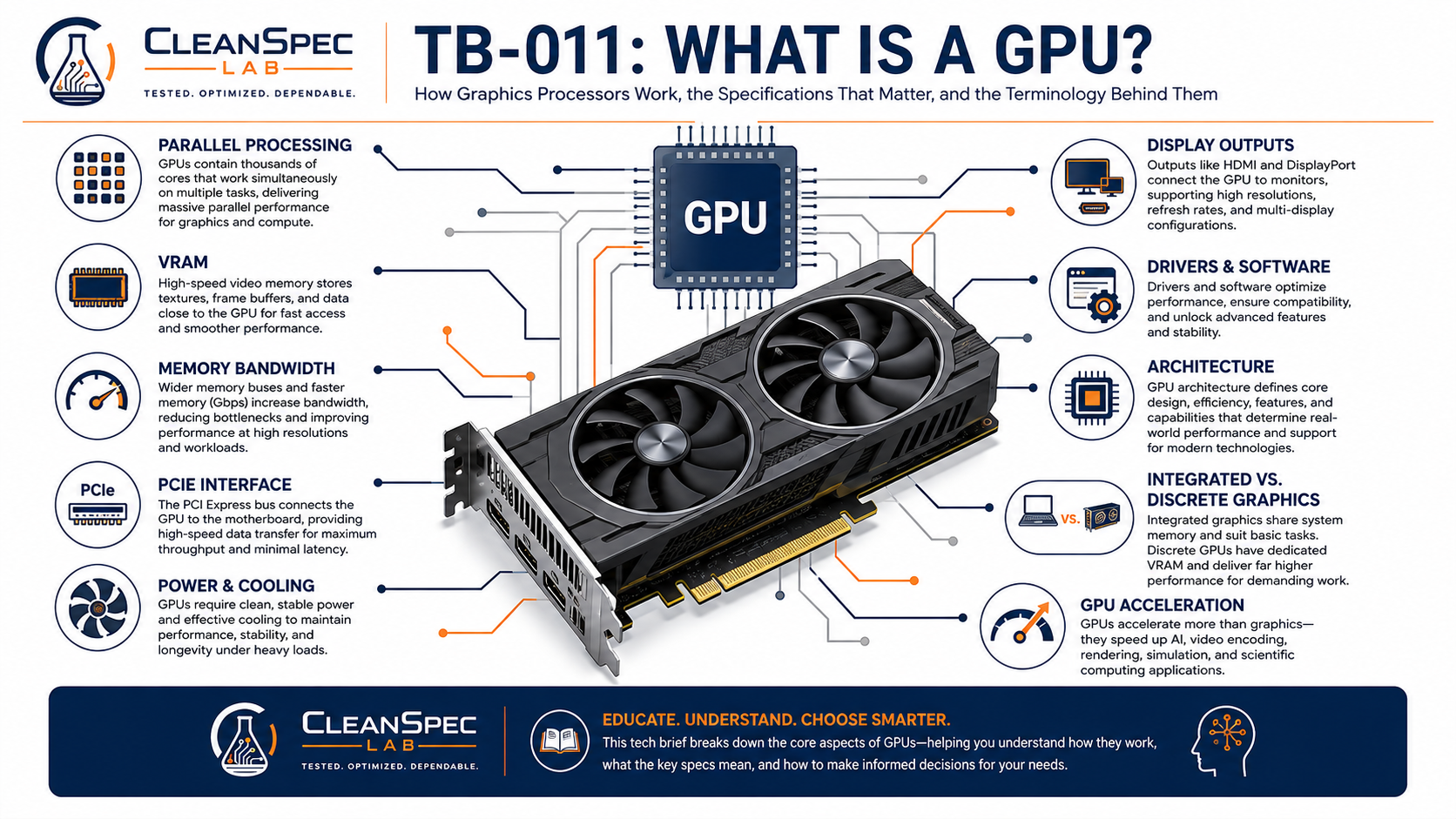
How Graphics Processors Work, the Specifications That Matter, and the Terminology Behind Them
A graphics processing unit, or GPU, is one of the most important—and frequently misunderstood—components in a modern computer.
For many buyers, the GPU is simply “the graphics card.”
That is close enough for casual conversation, but technically incomplete.
The GPU is the processor that performs graphics and other highly parallel calculations. A graphics card is the complete add-in board that may contain the GPU, video memory, power-delivery hardware, cooling, display outputs, and other supporting components.
Modern GPUs began as specialized processors for graphics, but they have evolved into highly programmable parallel processors capable of accelerating many different types of work.
Understanding a GPU therefore requires more than looking at the model number or the amount of memory printed on the box.
This Tech Brief establishes the basic concepts and terminology we will use in later discussions of NVIDIA, AMD, Intel, professional graphics, and GPU selection.
What Does a GPU Actually Do?
A CPU and GPU are both processors, but they are optimized for different kinds of work.
A CPU is designed to handle a wide variety of tasks, including work that must be completed sequentially or with very low latency.
A GPU is designed to perform large numbers of similar calculations in parallel.
That distinction makes GPUs especially effective for workloads where many pieces of data can be processed at the same time.
Examples include:
Drawing 2D and 3D graphics
Gaming
CAD and engineering visualization
Video processing
Photo and video effects
3D rendering
Scientific computing
Simulation
Machine learning
Artificial intelligence
Other GPU-accelerated applications
Modern GPUs contain many processing resources designed for high throughput, while CPUs typically use fewer, more general-purpose cores optimized for a wider range of instructions and system tasks.
Neither approach is universally better.
They are different tools designed for different kinds of work.
CPU vs. GPU
A useful simplified comparison is:
CPU: Excellent at handling varied, complex, sequential, and low-latency work.
GPU: Excellent at performing many similar operations simultaneously.
Imagine a workload involving thousands of individual calculations.
A CPU may work through a smaller number of those calculations at a time very quickly.
A GPU may process a much larger number simultaneously.
That parallel-processing capability is one reason GPUs became useful far beyond simply drawing images on a screen.
A Little More Technical
Modern GPUs contain large arrays of programmable processing units.
Different manufacturers use different terminology for these resources, and their capabilities vary significantly by architecture.
Because of those differences, simply comparing the number of GPU processing units across manufacturers—or even across generations from the same manufacturer—is usually misleading.
A larger core count does not automatically mean a faster GPU.
Architecture matters.
Clock speed matters.
Memory performance matters.
The workload matters.
And specialized hardware within the GPU may matter as well.
Integrated Graphics
Not every GPU exists on a separate graphics card.
Many processors include an integrated GPU.
Integrated graphics share the system’s broader power, cooling, and memory resources rather than using a completely separate add-in card with dedicated video memory.
This can provide important advantages:
Lower cost
Lower power consumption
Lower heat output
Smaller system size
Fewer components
Adequate performance for many everyday workloads
Integrated graphics can be an excellent choice for:
Office applications
Web browsing
Email
Streaming video
Schoolwork
Accounting software
Remote work
General productivity
Basic multi-monitor configurations
Modern integrated graphics can be considerably more capable than older integrated solutions, so the term integrated graphics does not describe one universal level of performance.
Integrated and discrete graphics are simply different approaches to providing GPU capability.
Discrete Graphics
A discrete GPU is separate from the CPU.
In desktop computers, it is commonly installed on a graphics card connected through a PCI Express slot.
A discrete graphics card typically contains:
The GPU itself
Dedicated video memory
Power-delivery circuitry
Cooling hardware
Firmware
Display outputs
A PCI Express interface
Discrete graphics generally provide substantially more graphics capability than basic integrated graphics, particularly for demanding 3D and computational workloads.
That additional capability comes with tradeoffs.
Discrete GPUs can require:
More power
More cooling
Additional chassis space
A sufficiently capable power supply
Additional cost
The presence of a discrete GPU therefore does not automatically make one computer better than another.
The real question is whether the workload benefits from it.
Dedicated Graphics and Discrete Graphics
The terms dedicated graphics and discrete graphics are frequently used interchangeably.
In ordinary PC discussions, they usually refer to graphics hardware that is separate from the CPU’s integrated graphics.
You may also encounter the abbreviations:
iGPU — integrated graphics processing unit
dGPU — discrete graphics processing unit
These terms are useful shorthand when discussing system configurations.
What Is VRAM?
VRAM stands for video random-access memory.
On a typical discrete graphics card, VRAM is memory dedicated to the GPU.
The GPU uses this memory to rapidly store and access information needed for graphics and computation.
Depending on the workload, that can include:
Textures
Frame buffers
Geometry
Images
3D models
Render data
Application datasets
Compute data
VRAM capacity is commonly expressed in gigabytes.
You might therefore see graphics cards advertised with:
2GB VRAM
4GB VRAM
8GB VRAM
16GB VRAM
or substantially more
More VRAM can be extremely useful when the workload requires it.
But this leads to one of the most important GPU concepts:
VRAM capacity is not the same thing as GPU performance.
A graphics card with 8GB of VRAM is not automatically faster than one with 4GB.
VRAM tells us how much data the card can keep readily available.
It does not tell us how quickly the GPU can process that data.
Memory Type and Memory Bandwidth
VRAM capacity is only one part of the GPU memory system.
Graphics cards may use different generations and types of graphics memory.
The speed at which information can move between the GPU and its memory is commonly described as memory bandwidth.
Higher bandwidth can be important when the GPU needs to move large amounts of data quickly.
Memory bandwidth depends on multiple factors, including:
Memory type
Memory speed
Memory interface width
GPU architecture
Memory-controller design
That means two GPUs with the same amount of VRAM can still have very different memory performance.
A Little More Technical
The memory bus width is often expressed in bits.
Examples might include:
64-bit
128-bit
192-bit
256-bit
A wider bus can allow more data to move simultaneously, but bus width should not be evaluated by itself.
Faster memory on a narrower interface can sometimes provide substantial bandwidth.
Modern GPU architectures may also use large caches, compression techniques, and other methods to reduce how often the GPU must access external VRAM.
This is another reason individual specifications should not be treated as universal performance rankings.
GPU Architecture
A GPU architecture is the underlying design of the processor.
Manufacturers periodically introduce new architectures that can change:
Processing efficiency
Core design
Cache structure
Memory behavior
Power efficiency
Graphics features
Compute capability
Media engines
Specialized acceleration
Supported software features
Architecture is closely related to generation, but the two terms are not always identical.
A manufacturer may use one architecture across several product families or market segments.
This distinction becomes important when we begin examining NVIDIA, AMD, and Intel product histories in later Tech Briefs.
Clock Speed
Like CPUs, GPUs operate at clock frequencies.
Clock speeds are commonly expressed in megahertz or gigahertz.
Higher clock speed can improve performance when comparing otherwise similar hardware.
But GPU clock speed is not a reliable way to compare unrelated GPUs.
A newer GPU running at a lower frequency may outperform an older design running at a higher frequency because it can accomplish more work during each clock cycle.
The same principle applies to CPUs.
Clock speed is one specification—not a complete performance measurement.
GPU Cores, Shaders, and Processing Units
GPU manufacturers divide their processors into large numbers of smaller computational resources.
Depending on the manufacturer and architecture, these may be described using terms such as:
Shader units
Stream processors
Execution units
CUDA cores
Vector units
Compute units
Those names do not all describe identical hardware.
Even within one manufacturer’s products, processing resources can change substantially from one architecture to the next.
This makes statements such as:
“This GPU has twice as many cores, so it must be twice as fast.”
unreliable.
Core counts are most useful when comparing closely related products built on the same or similar architecture.
Specialized GPU Hardware
Modern GPUs may contain specialized processing hardware in addition to their general graphics-processing resources.
Depending on the architecture, these components may accelerate tasks such as:
Ray tracing
Artificial intelligence
Matrix mathematics
Video encoding
Video decoding
Image processing
These capabilities can make two GPUs with similar traditional graphics performance behave very differently in specialized applications.
It is another reason benchmark results and workload-specific requirements often matter more than one headline specification.
What Is Ray Tracing?
Ray tracing is a rendering technique that models the paths of light through a virtual environment.
It can be used to calculate effects such as:
Reflections
Shadows
Lighting
Transparency
Surface interactions
Ray tracing is not new as a concept, but modern GPUs increasingly include specialized hardware that can accelerate these calculations in real time.
That does not mean every user needs ray-tracing capability.
For an office workstation running spreadsheets and web applications, it may have essentially no practical value.
For certain games, visualization workloads, and rendering applications, it can be much more important.
GPU Acceleration and Compute
Modern software can use GPUs for work that is not traditional graphics rendering.
This is commonly called GPU acceleration or GPU compute.
Applications can divide suitable workloads into many parallel operations and send those operations to the GPU.
Examples include:
Rendering
Video effects
Scientific calculations
Machine learning
AI
Simulation
Image processing
Whether GPU acceleration provides a major improvement depends heavily on the software.
A powerful GPU cannot accelerate an application that does not know how to use it.
Video Encoding and Decoding
Many GPUs contain dedicated hardware for processing video.
This may include hardware acceleration for formats such as:
H.264
H.265/HEVC
AV1
Other video formats
Support varies by GPU generation.
Hardware decoding can reduce CPU usage during video playback.
Hardware encoding can accelerate tasks such as:
Video production
Streaming
Screen recording
Video conversion
This capability can be important even when traditional 3D performance is not.
A newer modest GPU may therefore offer useful media capabilities that an older but more powerful GPU lacks.
PCI Express
Most modern desktop graphics cards connect to the motherboard using PCI Express, commonly abbreviated PCIe.
The familiar long graphics-card slot is usually physically an x16 PCIe slot.
PCI Express has evolved through multiple generations.
Common desktop platforms may use:
PCIe 2.0
PCIe 3.0
PCIe 4.0
PCIe 5.0
Each newer generation increases available data-transfer capability.
PCI Express is also designed with substantial compatibility between generations.
Newer cards can often operate in older slots and older cards in newer slots, with the connection operating according to the capabilities shared by both sides.
PCIe Lanes
PCI Express connections can use different numbers of data lanes.
Common configurations include:
x1
x4
x8
x16
A physical x16 graphics card does not necessarily use all 16 lanes electrically.
Some GPUs use fewer lanes by design.
The available PCIe bandwidth therefore depends on both:
PCIe generation
Number of active lanes
For many ordinary graphics workloads, PCIe bandwidth is not the primary performance limitation.
For some GPUs and specialized workloads, however, it can matter significantly.
Power Consumption
A dedicated GPU requires electrical power.
Lower-power graphics cards may obtain everything they need directly through the PCIe slot.
More powerful GPUs may require additional connections from the computer’s power supply.
Common auxiliary power arrangements have included:
6-pin connectors
8-pin connectors
Multiple connectors
Newer high-power connector designs
Power requirements matter because the graphics card is only one part of the entire computer.
The power supply must also support:
CPU
Memory
Storage
Fans
Expansion hardware
Motherboard
USB devices
Installing a GPU that exceeds the capabilities of the system’s power supply is not a reasonable upgrade.
TDP, TGP, TBP, and Board Power
GPU power specifications can become confusing because manufacturers may use different terminology.
You may encounter terms such as:
TDP — Thermal Design Power
TGP — Total Graphics Power
TBP — Total Board Power
The precise definitions can vary by manufacturer and generation.
For most buyers, the important practical lesson is simpler:
The graphics card has a power requirement, and the computer must be capable of safely supplying and dissipating that power.
Power consumption also affects:
Heat
Cooling
Noise
Power-supply requirements
System efficiency
Cooling and Sustained Performance
GPUs generate heat.
More powerful GPUs can generate substantial amounts of it.
Graphics cards may use:
Passive heatsinks
Small active fans
Blower-style cooling
Open-air coolers
Multiple fans
Liquid cooling
The cooling system must remove heat quickly enough for the GPU to maintain safe operating temperatures.
If temperatures or power limits become too high, a GPU may reduce its operating frequency.
This is commonly called thermal throttling or power throttling.
That means the peak specifications of a GPU do not necessarily describe the performance it can maintain during a long workload.
Form Factor
Graphics cards come in many physical sizes.
Important dimensions include:
Card height
Card length
Card thickness
A low-profile graphics card is designed for smaller chassis.
A full-height card requires a larger expansion opening.
Cards may also occupy:
One slot
Two slots
Three slots
More than three slots
Physical compatibility can therefore become just as important as electrical compatibility.
A graphics card can be technically supported by the motherboard and still not fit inside the computer.
Display Outputs
The GPU is also responsible for sending video signals to displays.
Common connections include:
DisplayPort
HDMI
DVI
Mini DisplayPort
USB-C-based display connections on supported hardware
Older systems may also use VGA.
The type and number of ports matter when a computer needs to support:
Multiple monitors
High resolutions
High refresh rates
Particular display connectors
For many business users, these practical display requirements can matter more than gaming performance.
Drivers
A GPU requires software that allows the operating system and applications to communicate with it.
This software is called a driver.
Drivers can affect:
Performance
Stability
Display support
Application compatibility
Hardware acceleration
Security
Available features
As GPUs age, driver support eventually becomes an important consideration.
A graphics card may still function electrically while becoming a less attractive long-term choice because software support has changed.
Graphics APIs
Applications normally do not communicate directly with GPU hardware.
They use standardized or vendor-specific programming interfaces.
Common graphics and compute APIs include:
DirectX
OpenGL
Vulkan
OpenCL
Manufacturer-specific compute platforms
These interfaces allow software developers to use graphics and computational capabilities without directly controlling every hardware detail.
GPU generations may support different versions or features within these APIs.
That can affect whether older hardware remains suitable for newer software.
Professional and Consumer Graphics
Graphics products are often divided broadly into consumer and professional categories.
Consumer GPUs commonly emphasize:
Gaming
General content creation
Consumer software
High performance per dollar
Professional GPUs may emphasize areas such as:
CAD
Engineering
Visualization
Certified applications
Driver validation
Stability
Specialized workflows
Multi-display environments
Particular memory or form-factor configurations
Those categories can overlap significantly.
A consumer GPU can perform professional work.
A professional GPU can run games.
The important question is not the label alone.
It is how the complete GPU fits the intended workload.
Later Tech Briefs will explore these differences more closely.
Why Benchmark Numbers Need Context
GPU benchmark scores can be extremely useful.
They can also be misleading when treated as universal rankings.
Different benchmarks may emphasize:
Gaming
Compute
Rendering
Memory performance
Ray tracing
Professional visualization
Particular software APIs
A GPU that performs extremely well in one benchmark may be mediocre in another workload.
The most useful comparison is therefore one that resembles the work the computer will actually perform.
No Single Specification Defines a GPU
One of the easiest mistakes when comparing graphics hardware is focusing on one specification.
Examples include:
“It has more VRAM.”
“It has more cores.”
“It has a higher clock speed.”
“It is PCIe 4.0.”
“It is newer.”
All of those facts can be useful.
None of them independently tells us which GPU is faster or which GPU is better for a particular computer.
A meaningful comparison considers the complete design.
A Practical GPU Vocabulary
Some of the most important terms to remember are:
GPU
The graphics processing unit itself.
Graphics card / video card
The complete add-in board containing a GPU and its supporting hardware.
Integrated graphics / iGPU
Graphics capability integrated into the processor or platform.
Discrete graphics / dGPU
A separate graphics processor, typically installed on its own graphics card.
VRAM
Dedicated memory used by the GPU.
Architecture
The underlying design generation of the GPU.
Clock speed
The operating frequency of the processor.
Memory bandwidth
The rate at which data can move between GPU processing resources and graphics memory.
PCI Express / PCIe
The primary interface used by modern desktop graphics cards.
PCIe lanes
The number of data pathways used by a PCIe connection.
Ray tracing
A method of rendering light behavior within a virtual scene.
GPU acceleration
Using GPU parallel-processing capability to accelerate application workloads.
Driver
Software that allows the operating system and applications to communicate with the GPU.
Thermal throttling
A reduction in operating performance when temperature limits are reached.
Low-profile
A graphics-card format designed for smaller chassis.
The Most Important Takeaway
A GPU is not defined by one number.
Performance and suitability depend on a combination of:
Architecture
GPU design
Processing resources
Clock behavior
VRAM capacity
Memory bandwidth
Power
Cooling
Software support
Physical compatibility
Workload
That is why meaningful graphics comparisons require more than simply asking:
How much VRAM does it have?
or:
What model number is it?
The better question is:
What is this GPU designed to do, and how well does it fit the computer and workload?
That foundation becomes especially important when comparing different manufacturers and generations.
The next Tech Briefs will apply these concepts to the major GPU families from NVIDIA, AMD, and Intel before bringing them together in a practical discussion of selecting graphics hardware for a complete system.
Trademark and Independence Acknowledgment
PCI Express and PCIe are trademarks and/or registered trademarks of PCI-SIG.
DirectX is a trademark of Microsoft Corporation.
OpenGL and Vulkan are trademarks of The Khronos Group Inc.
Other company names, product names, technologies, trademarks, and registered trademarks referenced in this Tech Brief are the property of their respective owners.
CleanSpec Lab is an independent refurbisher and is not affiliated with, endorsed by, sponsored by, or an authorized representative of the companies or standards organizations referenced in this Tech Brief.
Product and technology names are used solely for identification, compatibility discussion, technical education, and comparison.
No third-party logos, product photography, marketing graphics, diagrams, benchmark charts, or other copyrighted visual materials are reproduced in this Tech Brief.
References
Intel — What Is a GPU? Graphics Processing Units Defined
Intel — CPU vs. GPU: What’s the Difference?
Intel Support — What Is the Difference Between Integrated Graphics and Discrete Graphics?
NVIDIA — CPU vs. GPU: What’s the Difference?
NVIDIA — CUDA Programming Guide
PCI-SIG — PCI Express Compatibility and Frequently Asked Questions
CleanSpec Lab Technical Brief TB-007 — Processor Speed Isn’t What It Used to Mean
CleanSpec Lab Technical Brief TB-010 — How We Configure a Refurbished PC
Document Control
Document: TB-011
Revision: A
Approved by: CleanSpec Lab
Supersedes: None
Copyright © 2026 CleanSpec Lab. This document may be referenced with attribution.